
New-PASSession Deep Dive - Part 2: ISPSS & IdentityCommand
Back in New-PASSession Deep Dive we walked through how New-PASSession authenticates against a self-hosted CyberArk Privileged Access Manager installation - RADIUS challenges, IIS/Vault combined authentication, and SAML via Get-PASSAMLResponse.
Since that article was written, the CyberArk/Idira SaaS platform - Identity Security Platform Shared Services, or ISPSS - has become the common way a lot of new users are using psPAS to access Privilege Cloud. Authenticating against ISPSS doesn’t look anything like authenticating against a self-hosted Vault: instead of a single logon call to the PVWA, a request has to be authenticated against CyberArk Identity first, and only then handed a Privilege Cloud API URL to work against.
Rather than re-implementing an entire identity platform’s authentication surface inside psPAS, New-PASSession delegates this part of the job to a companion module, IdentityCommand.
This article is the “part 2” - what’s changed, what’s new, and how New-PASSession and IdentityCommand work together to get you a Privilege Cloud session.
What’s New Since Part 1
Everything covered in the original article still applies unchanged for self-hosted authentication. On top of that, New-PASSession has gained a family of ISPSS-* parameter sets:
ISPSS-Subdomain-IdentityUser/ISPSS-URL-IdentityUser- interactive authentication with a-Credential, including any MFA challenges configured for the user.ISPSS-Subdomain-ServiceUser/ISPSS-URL-ServiceUser- non-interactive authentication for a CyberArk Identity Service User (an OAuth2 client id/secret pair, provided as a-Credential), intended for unattended automation.ISPSS-Subdomain-SAML/ISPSS-URL-SAML- authentication using a SAML assertion obtained from a federated identity provider.
The -Subdomain/-URL split running through all three pairs reflects two different ways of telling New-PASSession where your tenant lives, covered below in Tenant Discovery.
A New Dependency: IdentityCommand
New-PASSession doesn’t implement CyberArk Identity’s authentication protocol itself. Instead, any ISPSS-* parameter set delegates the actual logon to IdentityCommand, a separate PowerShell module dedicated to CyberArk Identity operations, calling either New-IDSession (IdentityUser/SAML) or New-IDPlatformToken (ServiceUser).
That split is partly about keeping things tidy, but mostly about the fact that CyberArk Identity and the Privilege Cloud/PAS API are separate APIs with their own nuances - multi-step challenge/response, OOB polling, IdP redirects on one side, safes and accounts on the other. They’re just separate tools, with each maintained and released on its own schedule.
IdentityCommand is only ever needed if you actually use one of the ISPSS-* parameter sets (self-hosted users never need to install it). New-PASSession checks for it right before it’s needed:
if (-not (Get-Module IdentityCommand)) {
	try { Import-Module IdentityCommand -ErrorAction Stop }
	catch { throw 'Failed to import IdentityCommand: Install the IdentityCommand Module and try again.' }
}
Tenant Discovery
Before any authentication can happen, New-PASSession needs two URLs: one for CyberArk Identity (IdentityTenantURL) and one for the Privilege Cloud API (PrivilegeCloudURL). There are two ways to supply them:
- Provide both explicitly with
-IdentityTenantURLand-PrivilegeCloudURL(theISPSS-URL-*parameter sets). - Provide just
-TenantSubdomain(theISPSS-Subdomain-*parameter sets) and letNew-PASSessionresolve both URLs for you.
The subdomain path is handled by the private Find-SharedServicesURL helper, which queries CyberArk’s public platform discovery service and returns the full set of shared-service URLs registered for that subdomain - Identity, Privilege Cloud, and several others:
Find-SharedServicesURL -subdomain somedomain -service pcloud
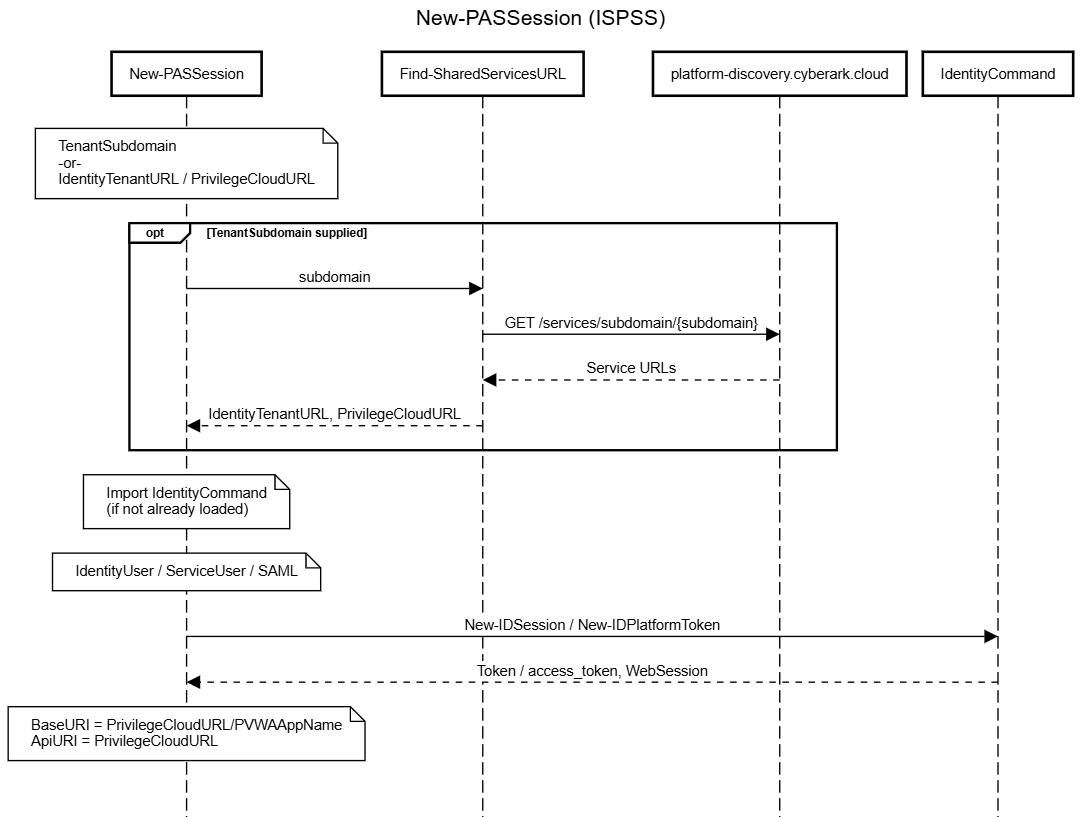
Whichever route is used, once both URLs are known, the flow converges - the IdentityTenantURL is handed to IdentityCommand to authenticate against, and the PrivilegeCloudURL becomes the base for every subsequent psPAS command in the session.
Identity User Authentication
-IdentityUser is the interactive case: a human, a -Credential, and potentially an MFA challenge to satisfy - the CyberArk Identity equivalent of typing your password and then approving a push notification.
New-PASSession hands off to New-IDSession -Credential, which drives CyberArk Identity’s multi-step authentication API:
Start-Authenticationposts the username to/Security/StartAuthentication. The response may redirect to a different pod for the actual tenant, in which case the request is retried against the new host, or it may return a list of challenge mechanisms the user must satisfy.- For each challenge,
Select-ChallengeMechanismandGet-MechanismAnswerwork out what’s being asked (password, OATH OTP, email/SMS code, push notification, security question, …) and obtain an answer, beforeStart-AdvanceAuthenticationposts it to/Security/AdvanceAuthentication. - Out-of-band mechanisms (push, email, SMS) return an
OobPendingstatus that’s polled every couple of seconds until the user responds, rather than requiring an immediate answer. - Once every challenge in the set has been satisfied, a bearer
Tokenis returned.
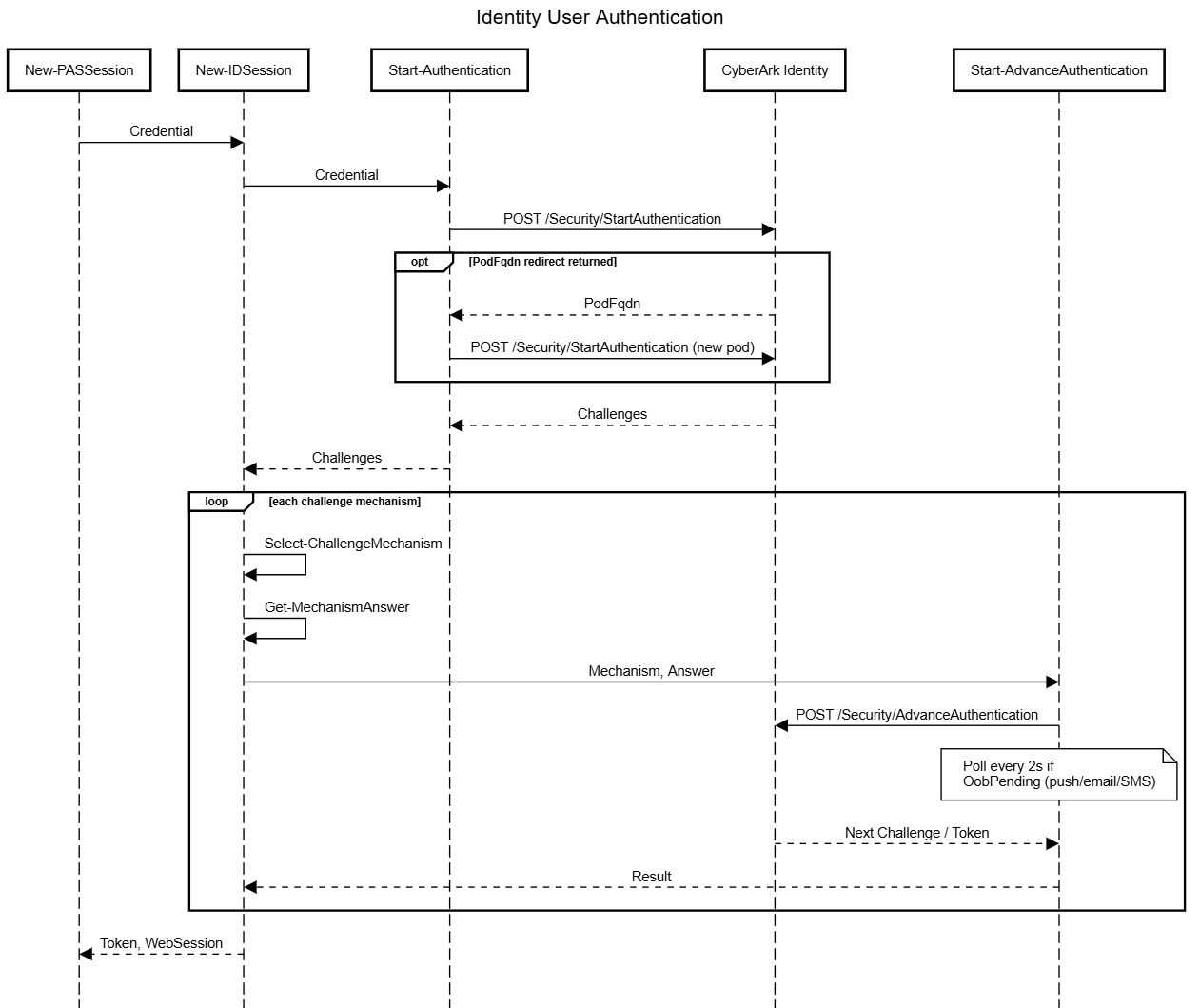
This is the closest ISPSS equivalent of Part 1’s RADIUS challenge/response flow - a loop of challenge and answer - except here the entire loop happens inside IdentityCommand, and New-PASSession only ever sees the final Token.
Service User Authentication
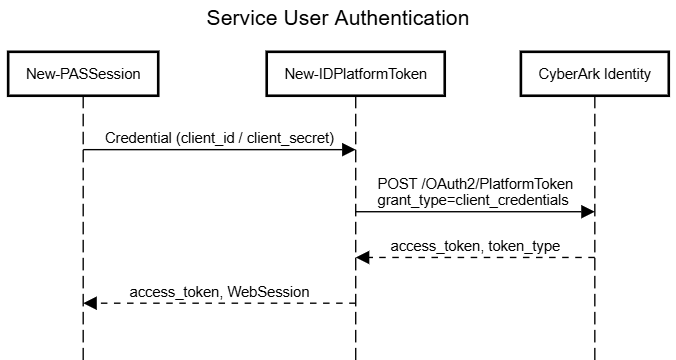
-ServiceUser is the non-interactive case, intended for scheduled tasks, pipelines, and other unattended automation where there’s no human available to answer an MFA challenge. A CyberArk Identity Service User is configured with an OAuth2 client id and secret, supplied to New-PASSession as a -Credential in the same way any other credential is.
New-PASSession hands off to New-IDPlatformToken, which performs a standard OAuth2 client-credentials grant against /OAuth2/PlatformToken:
$LogonRequest['Body'] = @{
	grant_type    = 'client_credentials'
	client_id     = $($Credential.UserName)
	client_secret = $($Credential.GetNetworkCredential().Password)
}
SAML Authentication via Identity
The newest addition to the ISPSS family lets a SAML assertion obtained from a federated identity provider be exchanged for a Privilege Cloud session, using the same -SAMLResponse parameter already familiar from Part 1’s Gen1/Gen2 SAML parameter sets - only this time it’s presented to CyberArk Identity rather than directly to a self-hosted PVWA.
New-IDSession -SAMLResponse drives this in two steps:
Start-SamlAuthenticationposts the assertion to the tenant’s/myendpoint. A successful response sets a handful of authentication cookies (.ASPXAUTH,antixss,CCSID,podloc,sessdata,userdata) into the request’sWebSession.Complete-SamlAuthenticationthen issues aGETagainst/loginusing that sameWebSession, so the cookies just obtained are presented back to the tenant, which responds with the bearerToken.
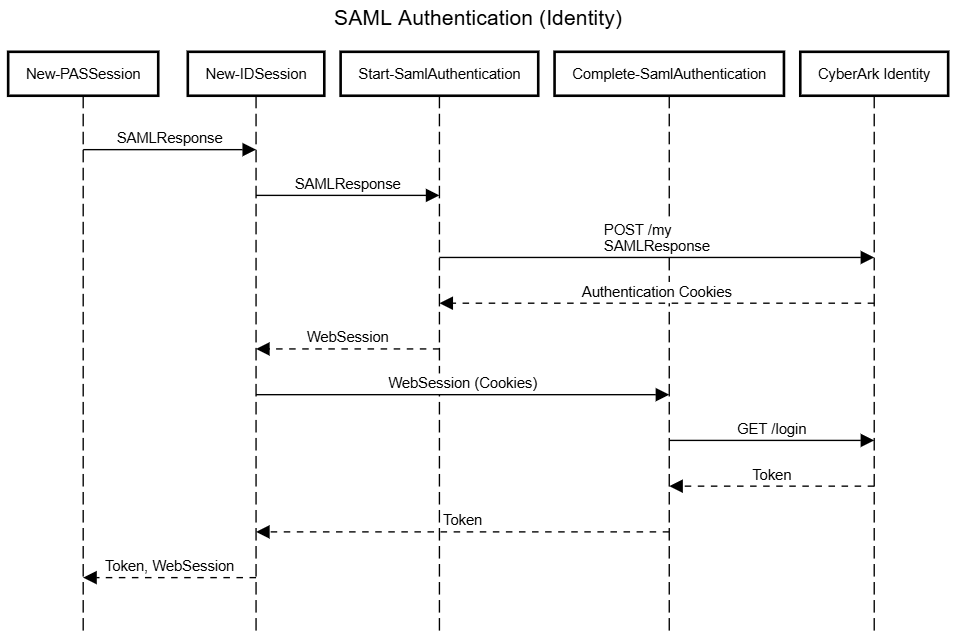
As with self-hosted SAML, obtaining the SAMLResponse value from your IdP in the first place is outside psPAS’s scope - see Part 1’s notes on PS-SAML-Interactive for one community-provided way to get one interactively.
- it’s worth noting that if your tenant is configured to use SAML authentication, the IdentityUser authentication flow should get you through that process without the need for you to obtain and provide a
SAMLResponseup front.
Feeding the Result Back into psPASSession
However you get there, IdentityCommand hands New-PASSession back an object shaped differently depending on the auth method - a Token property for IdentityUser/SAML, or an access_token/token_type pair for ServiceUser - alongside a GetWebSession() script method that IdentityCommand attaches to let New-PASSession retrieve the WebSession it built up during authentication (cookies and all).
New-PASSession’s existing result-handling switch, already responsible for recognising a classic CyberArkLogonResult or Gen2 LogonResult from self-hosted logons, gained two more branches to recognise these shapes and normalise them into the same thing every other psPAS command expects - a single Authorization header value on $psPASSession.WebSession:
( { $null -ne $PSItem.access_token } ) {
	#Shared Service access_token.
	$CyberArkLogonResult = "$($PASSession.token_type) $($PASSession.access_token)"
	$psPASSession.WebSession = $($PSItem.GetWebSession())
}

( { $null -ne $PSItem.Token } ) {
	#Shared Services Identity User Bearer Token
	$CyberArkLogonResult = "Bearer $($PASSession.Token)"
	$psPASSession.WebSession = $($PSItem.GetWebSession())
}
Two more values are set that don’t apply to self-hosted sessions:
$psPASSession.BaseURIis set to the Privilege Cloud PVWA URL (PrivilegeCloudURL/PVWAAppName), exactly asBaseURIis for a self-hosted session - every other psPAS command keeps working against it unmodified.$psPASSession.ApiURIis set to the rawPrivilegeCloudURL, without the rest of the module needing to know how the session was authenticated. It’s how helpers likeGet-NextLinkand version-aware commands can tell a Privilege Cloud session apart from a self-hosted one, since the two don’t always shape pagination and version-gated responses the same way.
From here on, the session behaves exactly as described in Part 1 and in Anatomy of a psPAS Command - every other command reads $psPASSession.WebSession and $psPASSession.BaseURI without caring whether New-PASSession got there via a Vault logon or via IdentityCommand.
Summary
Authenticating to ISPSS/Privilege Cloud looks nothing like authenticating to a self-hosted Vault under the hood, but New-PASSession soaks up that difference for you: three ISPSS parameter sets, a lazily-loaded dependency on IdentityCommand, and a bit of result normalisation at the end, and the rest of psPAS never has to know which kind of session it’s talking to.
Did we forget anything?
Let us know if there is any further information you would want to see or if you have any questions that have not been answered.
