
Anatomy of a psPAS Command
In this article we will delve into the structure of psPAS commands.
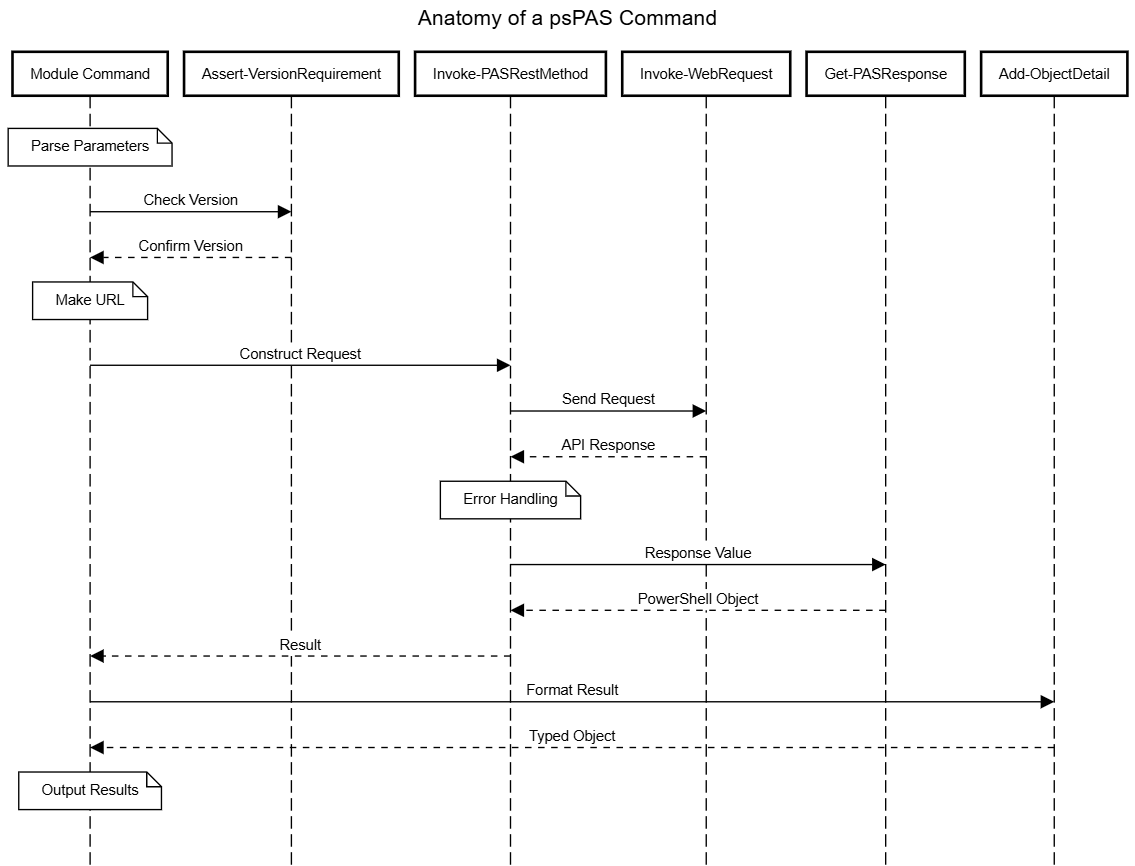
Every request made by a psPAS command to the CyberArk API passes through the same sequence of steps, whether the command is retrieving a single account, onboarding a new safe member, or invoking a CPM operation:
- Parse the parameters supplied to the command.
- Check that the target CyberArk version, and environment type, supports the command and the parameters used.
- Build the request URL, including any query string or filter.
- Construct the request, including any body payload.
- Send the request to the API.
- Format and return any results received.
Need Less, Have More
If the psPAS project had a motto, it would be “Need Less, Have More”; the principle behind the style adopted for the module is to emphasise simplicity and efficiency, using code that is concise, readable, and easy to maintain, avoiding complexity and redundancy, without sacrificing clarity or maintainability.
The intention of development time put into the psPAS “Need Less, Have More” style, is to save time; simplifying future development cycles.
Some of the patterns adopted for psPAS are:
- Meaningful variable and function names with consistent use of powershell approved verbs are used throughout.
- Use of standard formatting patterns, whitespace, and comments make the code easy to read and understand.
- Duplicate code is avoided by creating helper functions & classes which can be reused throughout the module.
- The code is kept modular, divided into into small, independent function files which can be tested independently.
- We optimize for performance, using efficient methods & data structures.
- Use of automated tests for the module code ensures that it works as expected.
By following these guidelines if contributing to the project, we can ensure code is effective, efficient, and easy to maintain.
When you, the module user, review any of the module files, our coding style helps by being easier to read and understand.
Simplicity & Structure
After authentication with New-PASSession, for which a detailed break down was provided in our previous article, every psPAS
command follows the same basic structure:
- Perform a version check against the API and the command being issued.
- Create the request URL and body payload.
- Invoke the command, sending the request to the API endpoint.
- Format any results received from the command output.
We will explore each of these structural elements, and the internal helper functions behind them, in the sections that follow, using Get-PASAccount - one of the most heavily used commands in the module - as a running example.
Version Check
In 2017, when the CyberArk PAS toolset was iterating through the version 9.x releases, development and of psPAS started and the first version of the module was published to GitHub. Since then, the psPAS module has expanded to encompass each individual API command documented for CyberArk Privileged Access Manager.
As some commands or parameters are only relevant for certain version levels of the CyberArk API, a lot of issues logged against the psPAS module in the early days were related to command or parameter usage against incompatible versions. As the intention is for psPAS to maintain compatibility with past, present & future versions of CyberArk Privileged Access Manager, a mechanism to prevent inadvertent use of unsupported commands for any particular CyberArk version was required to avoid incompatible commands being issued and to save time spent investigating issues caused by incompatible versions.
The Assert-VersionRequirement helper function was developed to provide us this mechanism. It is used throughout the module to affirm that a version satisfies a required level, and it throws an error if a provided version number does not meet or exceed a required level.
This basic example illustrates asserting that version 1.0 is meets the required version level of 0.5. Nothing is returned from the function as 1.0 exceeds 0.5.
Assert-VersionRequirement -ExternalVersion 1.0 -RequiredVersion 0.5
Conversely in the next example, asserting that version 1.0 is meets the required version level of 2.0, the function throws an error as 1.0 does not equal or exceed 2.0.
Assert-VersionRequirement -ExternalVersion 1.0 -RequiredVersion 2.0
To allow for occurrences where API functionality may be depreciated in certain CyberArk versions, there is also a mechanism to check a maximum version is not exceeded. In this example, an error is thrown by the function as 1.0 exceeds the maximum version of 0.5.
Assert-VersionRequirement -ExternalVersion 1.0 -MaximumVersion 0.5
Beyond version numbers, some functionality is only relevant to one type of CyberArk implementation. The PrivilegeCloud and SelfHosted switch parameters let a command assert that it is only being run against the applicable solution type, throwing an error otherwise. $psPASSession.BaseUri is inspected for this - a cyberark.cloud address identifies a Privilege Cloud shared services implementation, anything else is treated as Self-Hosted.
Assert-VersionRequirement -PrivilegeCloud
The Assert-VersionRequirement helper function itself relies on 3 separate helper functions, Compare-MinimumVersion,
Compare-MaximumVersion & Get-ParentFunction.
Compare-MinimumVersion & Compare-MaximumVersion simply compare 2 version numbers, returning a TRUE value if the specified version number exceeds a designated minimum version number, or does not exceed a designated maximum version number. A value of FALSE is returned if the minimum version number, or the maximum version number requirement is not met.
Together Compare-MinimumVersion & Compare-MaximumVersion provide the logical components required for Assert-VersionRequirement to be able to “do the needful”.
Get-ParentFunction lets us get some meaningful information back to a user when reporting any kind of issue with version dependant functionality. Specific version requirements could be based on invocation of an arbitrary psPAS command, this function was developed to let us provide the name of the psPAS function, and any specific parameterset, behind any reported error condition.
When the helper function is invoked, it exists in a child scope of the Assert-VersionRequirement function, which itself exists in a child scope of the parent psPAS function. Get-ParentFunction retrieves the variable values for $MyInvocation & $PSCmdLet from the scope of the parent function so that the parent function name and the name of the parameterset used can be reflected in any error message.
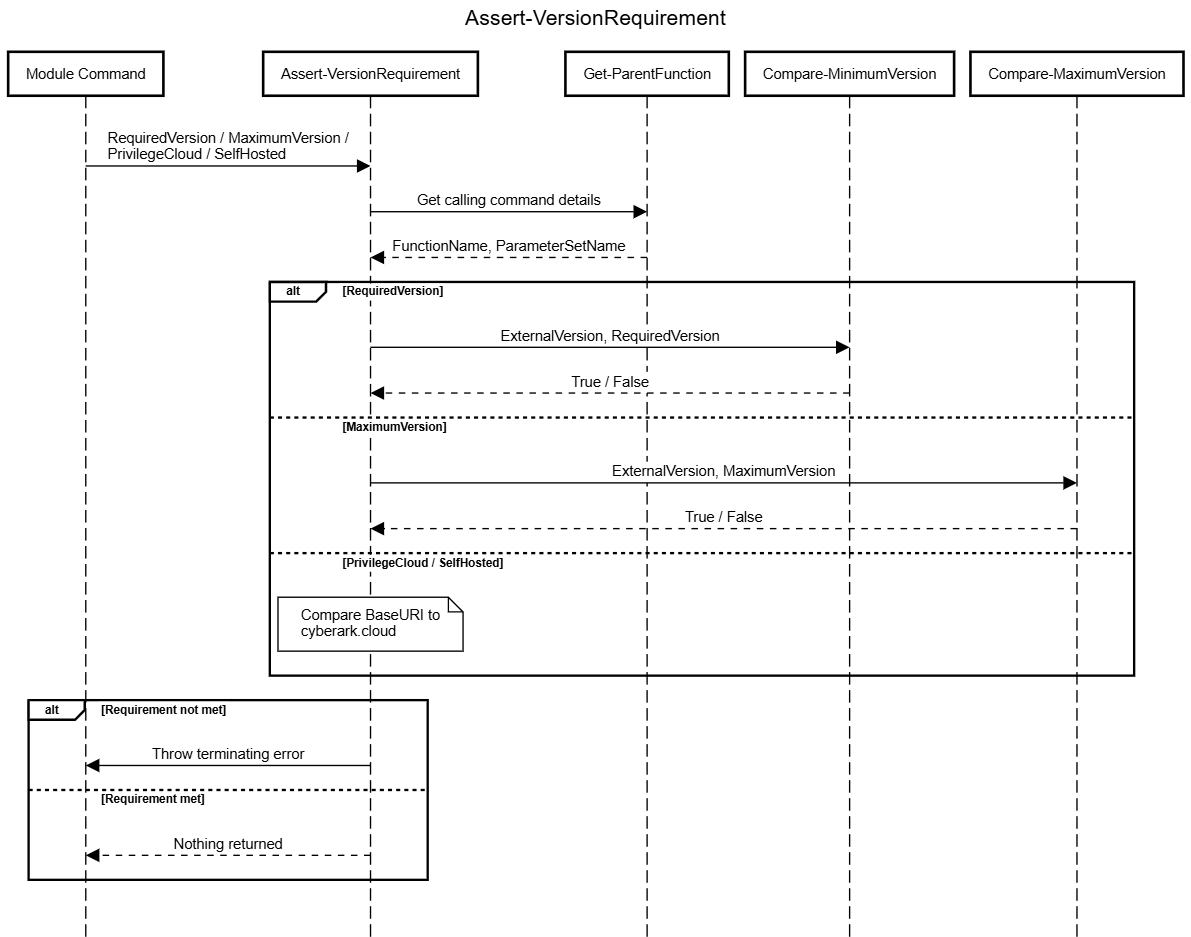
This all matters because a psPAS release and a CyberArk solution release move independently of each other. A user may install the latest version of the module against an older, self-hosted environment that predates a parameter’s minimum required version, or may hold on to an older psPAS release long after CyberArk has retired the API behaviour a newer command depends on. Assert-VersionRequirement is what lets a single command body cope with either situation consistently - rather than every function needing its own bespoke version-gating logic, an unsupported parameter or parameterset combination is always reported back the same way, with the offending command, parameterset, and version requirement named in the error.
Get-PASAccount puts most of these checks to use at once. Different parameters exposed by the command require different minimum API versions, and one value of the savedFilter parameter, DeleteInsightStatus, is only meaningful for Privilege Cloud:
switch ($PSBoundParameters) {

	( { $PSItem.ContainsKey('savedFilter') }) {
		Assert-VersionRequirement -RequiredVersion 12.6

		if ($savedFilter -eq 'DeleteInsightStatus') {
			#DeleteInsightStatus is only applicable to Privilege Cloud
			Assert-VersionRequirement -PrivilegeCloud
		}

	}

	( { $PSItem.ContainsKey('modificationTime') }) {
		Assert-VersionRequirement -RequiredVersion 11.4
	}

	default {
		#check minimum version
		Assert-VersionRequirement -RequiredVersion 10.4
	}

}
Only the checks relevant to the parameters actually supplied by the caller are evaluated, so a simple Get-PASAccount -search foo never pays the cost, or the risk of failure, of a check for a parameter it didn’t use.
Get Parameters
Once a command knows it’s allowed to proceed, it needs to work out what to actually send to the API. Every parameter a user supplies lands in the automatic $PSBoundParameters variable, but that hashtable also contains things that have no place in a request body or query string - common parameters like -Verbose and -Confirm, and psPAS-specific plumbing parameters like -TimeoutSec or -UseClassicAPI.
Get-PASParameter is the helper responsible for trimming $PSBoundParameters down to only what’s relevant. It has two modes, controlled by its parameter set:
- By default it removes a fixed list of common/plumbing parameter names (plus any extra names passed via
-ParametersToRemove), returning everything else. - Given
-ParametersToKeep, it does the opposite, returning only the named parameters - this is how a command pulls out just the values destined for the filter/query string, separately from the values destined for the request body.
#Everything except the values used to build the filter
$boundParameters = $PSBoundParameters | Get-PASParameter -ParametersToRemove $Parameters

#Only the values used to build the filter
$filterParameters = $PSBoundParameters | Get-PASParameter -ParametersToKeep $Parameters
With the right values isolated, two more helpers turn them into strings that belong in a URL:
ConvertTo-QueryStringtakes a hashtable and joins each key/value pair asKey=Value, joining multiple pairs with&, escaping each value withGet-EscapedStringalong the way. This is what produces the?key=value&key=valueportion of a request URL.ConvertTo-FilterStringtakes a hashtable and instead produces a singlefilterkey, joiningKey eq Valuepairs together withAND(orOR, for API versions that support a-LogicalOperator). AmodificationTimekey is treated specially, converted to unix time and compared withgteinstead ofeq, matching how the CyberArk API expects date-based filtering to be expressed.
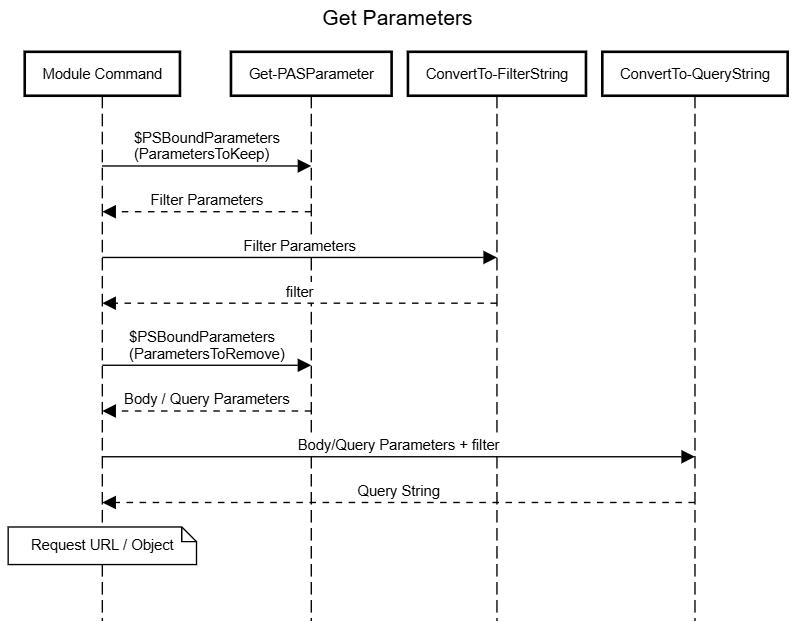
Get-PASAccount uses both together - the filter string produced by ConvertTo-FilterString is folded back into the same hashtable that ConvertTo-QueryString then serialises, so a search against several filterable properties and a sort/limit value ends up in the same query string:
$boundParameters = $PSBoundParameters | Get-PASParameter -ParametersToRemove $Parameters
$filterParameters = $PSBoundParameters | Get-PASParameter -ParametersToKeep $Parameters

$FilterString = $filterParameters | ConvertTo-FilterString

if ($null -ne $FilterString) {
	$boundParameters = $boundParameters + $FilterString
}

$queryString = $boundParameters | ConvertTo-QueryString

if ($null -ne $queryString) {
	$URI = "$URI`?$queryString"
}
Which properties are even available to filter or search on isn’t always fixed at development time either - newer, self-hosted API versions expose a searchable-properties endpoint, and Get-PASAccount uses a dynamicparam block to query it and generate a matching PowerShell parameter for each one at runtime, so the command’s parameters stay in step with whatever the connected CyberArk instance actually supports, without psPAS needing a release for every new searchable property CyberArk adds.
Command Invocation
With a URL (and, for anything other than a GET, a body) built, the request is handed off to Invoke-PASRestMethod, the module’s single point of contact with Invoke-WebRequest. Every request psPAS makes, including those made by New-PASSession itself, passes through this function, which means request-level concerns only need to be solved once:
- It defaults
ContentTypetoapplication/jsonand always passes-UseBasicParsing. - On PowerShell Core it adds
-SkipHeaderValidationand forces-SslProtocol TLS12; on any platform it ensures TLS 1.2 is enabled as a security protocol if it isn’t already. - Unless an alternate
-WebSessionor-SessionVariableis supplied, it automatically reuses$psPASSession.WebSession- the authenticated session established byNew-PASSession- so individual commands never need to think about authentication at all. - If
-SkipCertificateCheckwas requested, it’s tracked in script scope so that certificate validation stays bypassed for the lifetime of the session, not just a single request.
$result = Invoke-PASRestMethod -Uri $URI -Method GET -TimeoutSec $TimeoutSec
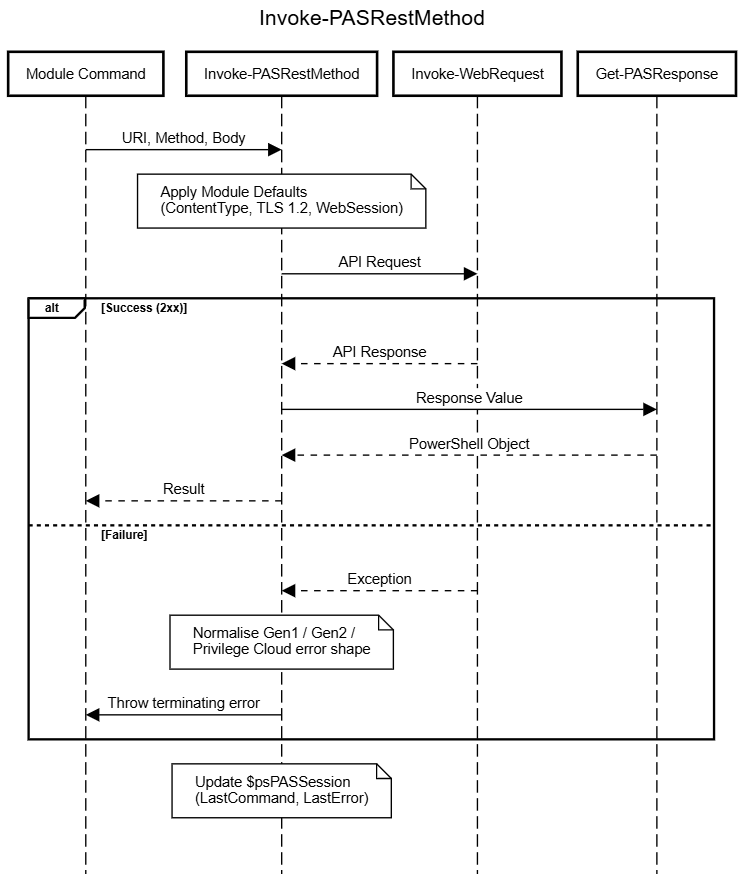
Invoke-PASRestMethod also owns all of the module’s error handling. CyberArk’s API doesn’t return errors in a single consistent shape - the legacy Gen1 PIMServices.svc endpoints, the Gen2 /api/... endpoints, and Privilege Cloud’s cyberark.cloud shared-services endpoints all describe failures slightly differently. Rather than every command needing to know how to unpick each of these, Invoke-PASRestMethod catches the exception Invoke-WebRequest throws, works out which shape it’s dealing with, and re-throws a single normalised terminating error containing an ErrorMessage and an ErrorID/ErrorCode, regardless of which flavour of API produced it. A System.UriFormatException - typically meaning $psPASSession.BaseURI was never set - is caught separately and rewritten into a nudge to run New-PASSession.
For diagnostic purposes, whatever happens, $psPASSession is updated with details of the request: LastCommand (via Get-ParentFunction), LastCommandResults, LastCommandTime, and, on failure, LastError/LastErrorTime. This is what lets a user inspect $psPASSession after the fact to see exactly what the last command sent and received, without psPAS needing dedicated -Verbose/-Debug output for every command.
If the request succeeds - a 2xx status code - the raw WebResponseObject is piped to Get-PASResponse for shaping. If it fails, nothing is returned; the terminating error takes care of stopping the pipeline.
Format Output
Get-PASResponse is responsible for turning the raw HTTP response into something a PowerShell caller actually wants back. It inspects the response’s Content-Type header to decide what to do with the Content:
application/json- by far the most common case - is passed toConvertFrom-Jsonand returned as a custom object.text/htmlcontent is only ever expected to appear when something has gone wrong upstream (a proxy or gateway returning an HTML error page rather than a JSON API response); if it looks like an HTML document, a terminating “Guru Meditation” error is thrown rather than returning an unusable string to the caller.- Anything else - notably a byte array, as used when a command retrieves a file - is passed back together with the response headers, ready to be handed to the internal
Out-PASFilehelper to be written to disk.
Some API responses represent more results than fit in a single page. Get-NextLink handles following these through to completion, transparently to the calling command. CyberArk’s various APIs don’t all paginate the same way, so Get-NextLink first works out which shape it’s looking at:
- A
nextLinkornextCursorproperty, alongside avalue/itemscollection - the function repeatedly requests the next link/cursor and accumulates results until none remain. - A
totalCount/Totalproperty with no link/cursor property at all - instead, the function pages through results by repeatedly requesting the original URI with an incrementingoffsetquery parameter, until the reported total number of results has been collected.
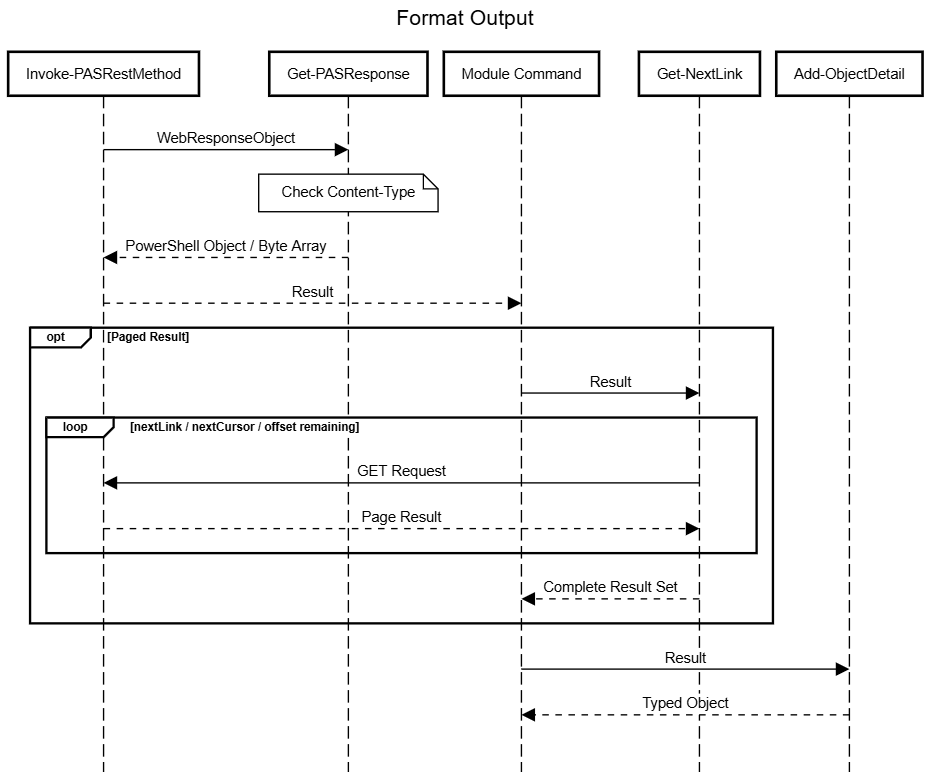
Get-PASAccount relies on this for its default (Gen2 query) parameter set, so a search matching hundreds of accounts is returned to the caller as a single, complete collection, however many pages of results the API actually needed to satisfy it:
$DefaultParams = $PSBoundParameters | Get-PASParameter -ParametersToKeep SavedFilter, TimeoutSec

$return = $Result | Get-NextLink @DefaultParams
Finally, before anything is handed back to the user, results are passed through Add-ObjectDetail, which inserts a psPAS.CyberArk.Vault.* type name onto each object:
$return | Add-ObjectDetail -typename $typeName
This is more than cosmetic - it’s what the .ps1xml format/type data in psPAS\xml\ hooks into, adding extra ScriptMethods to certain returned objects (for example, the SafeMembers() method available on the safe objects returned by Get-PASSafe). Add-ObjectDetail can also attach extra note properties or a custom default display property set, which is how, for example, Get-PASAccount’s Gen1 parameter set is able to flatten each account’s dynamic properties/InternalProperties arrays into a single, well-behaved PowerShell object before it’s returned.
Summary
From parameter parsing through to the object finally landing in your PowerShell session, every psPAS command follows the same handful of steps, backed by the same small set of internal helper functions - Assert-VersionRequirement, Get-PASParameter, ConvertTo-QueryString/ConvertTo-FilterString, Invoke-PASRestMethod, Get-PASResponse, Get-NextLink, and Add-ObjectDetail.
Reusing this pattern everywhere is what keeps ~200 public commands consistent, testable, and quick to add to - a new command is mostly a case of describing its parameters and its URL, and letting the existing internals do the rest.
Did we forget anything?
Let us know if there is any further information you would want to see or if you have any questions that have not been answered.
