
Tier Zero Coverage with Deetz
Most PAM programmes start in the same place: protect the Domain Admins and Enterprise Admins, rotate their passwords, put their sessions behind session management. That’s a good place to start - but it’s rarely where Tier Zero ends.
Tier Zero is every account that can take control of the domain, and Active Directory hands out that control in plenty of ways that have nothing to do with Domain Admins: the built-in operator groups, rights to replicate secrets, control of the containers and objects that hold the admins, delegation, managed service account passwords, and anything a trusted domain puts into one of your groups. If an account in any of those places isn’t in the vault, the vault isn’t protecting the domain - any attacker can just take a side door.
Deetz is a PSPete PowerShell module which finds those accounts. This article walks through using it alongside psPAS to answer three questions:
- What is actually Tier Zero in my domain?
- How much of it is in the vault?
- How do I onboard the rest?
The Environment
Everything in this article comes from an environment built to look like a typical, slightly untidy, enterprise:
contoso.lab- the domain being assessed, with two domain controllers and a read-only domain controller.emea.contoso.lab- a child domain in the same forest.partner.lab- a separate forest with a two-way forest trust.legacy.lab- a separate domain with a one-way external trust (contoso trusts legacy).
The accounts are named after band members, one band for each way an account gets into Tier Zero:
| Band | Domain | Accounts | Route into Tier Zero |
|---|---|---|---|
| The Beatles | contoso.lab |
adm-jlennon, adm-pmccartney, adm-gharrison, adm-rstarr |
Enterprise Admins and Domain Admins - the obvious ones. |
| The Rolling Stones | contoso.lab |
adm-mjagger, adm-krichards, adm-cwatts, adm-rwood, adm-bwyman |
The built-in operator groups and Administrators. |
| Metallica | contoso.lab |
adm-jnewsted, jhetfield, khammett, lulrich |
Schema Admins, and less obvious rights: gMSA passwords, delegation, RODC management. |
| Sex Pistols | contoso.lab |
jrotten, svicious, sjones, pcook, gmatlock |
Permissions on directory containers and objects - no admin group membership at all. |
| Dead Kennedys | emea.contoso.lab, partner.lab, legacy.lab |
adm-dhpeligro, adm-jbiafra, ebray, DK-Legacy-Ops |
Accounts and groups from other domains, in contoso groups. |
Alongside them are the service and machine accounts every domain has: svc-sql, svc-backup, the gmsa-backup$ managed service account and the BACKUP01$ backup server.
The PAM team has done the obvious first step: the Domain Admins and Enterprise Admins of contoso.lab are vaulted in a T0-Domain-Admins safe.
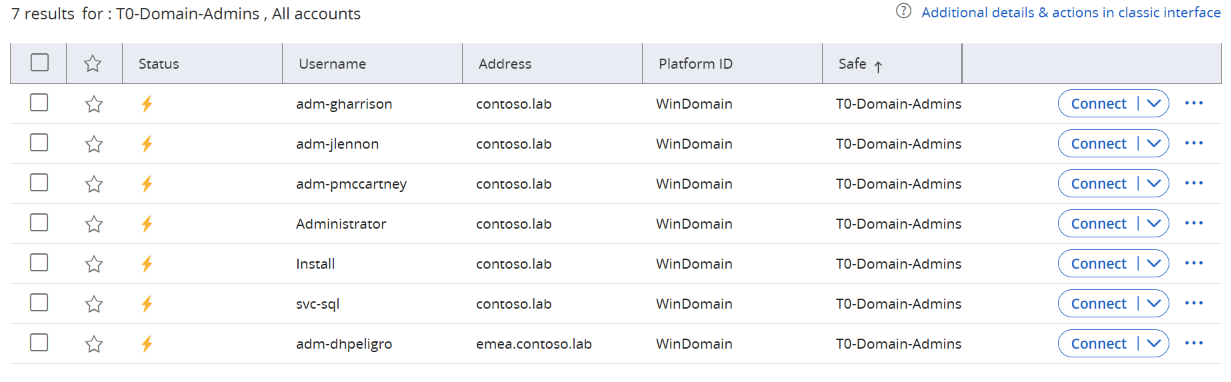
Seven accounts. Let’s see how that compares to the real Tier Zero footprint.
Installing Deetz
Deetz is on the PowerShell Gallery. It runs on Windows PowerShell 5.1 and PowerShell 7, and needs the ActiveDirectory module from RSAT:
Install-Module Deetz -Scope CurrentUser
It only reads from the directory - nothing is changed - and needs no admin rights: an ordinary domain user account will do. Run it from a domain joined machine that can reach the domains of the forest, and any trusted domains you want followed.
Finding Tier Zero
Get-TierZeroAccount does the discovery:
$T0 = Get-TierZeroAccount
$T0
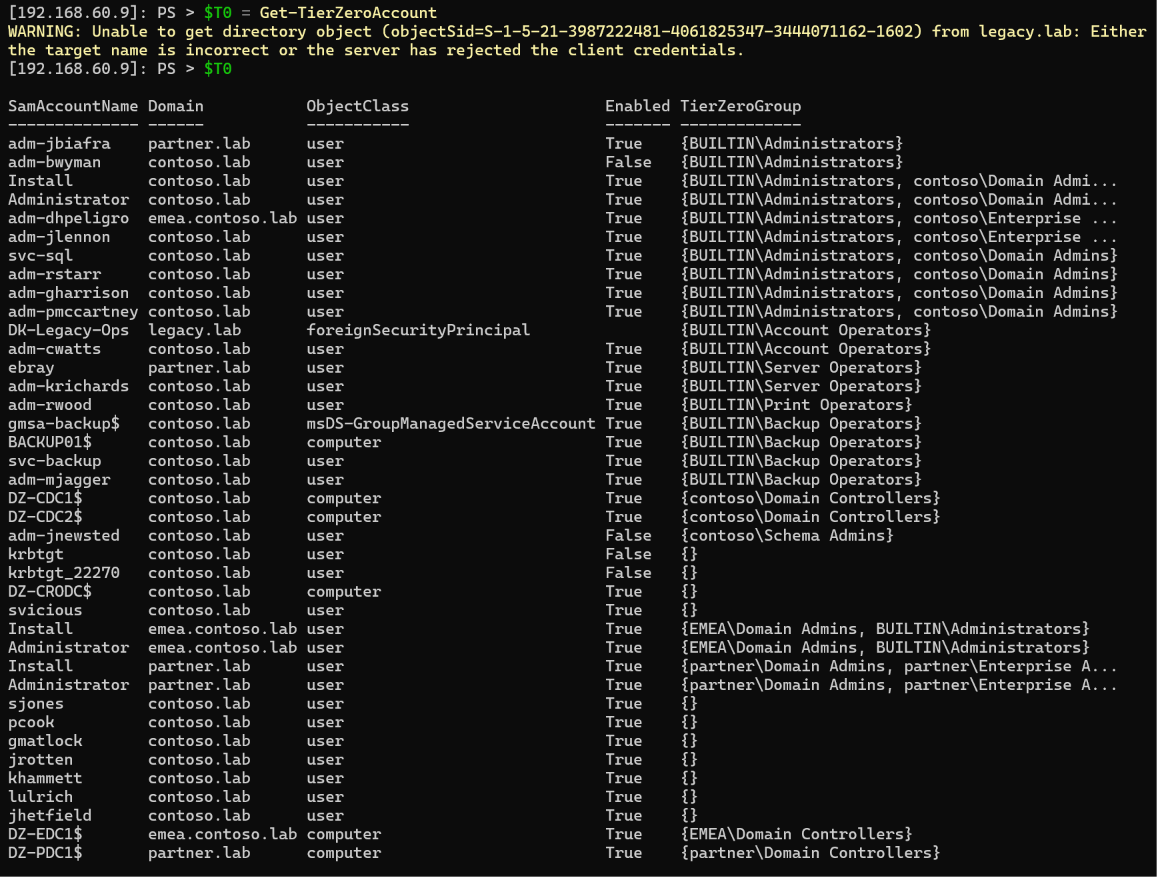
Thirty nine accounts, against seven in the vault.
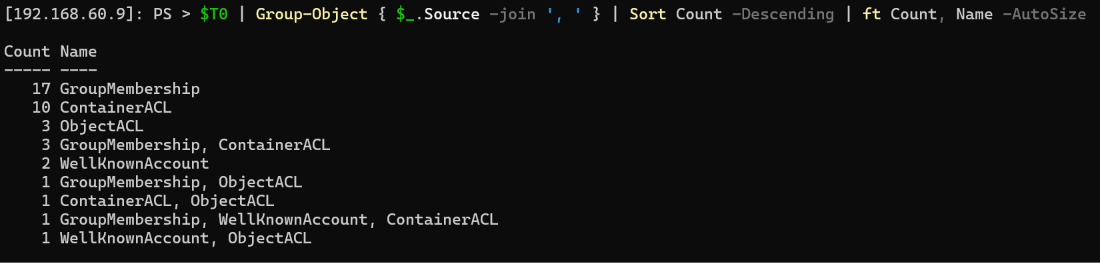
Deetz finds accounts four ways, and reports every way each account was found:
- GroupMembership - direct, nested and primary group members of the groups rated Tier Zero by the SpecterOps Tier Zero Table: not only Domain Admins and Enterprise Admins, but Administrators, Account Operators, Server Operators, Print Operators, Backup Operators, Schema Admins, Key Admins and others. Membership is followed through nested groups, across domains in the forest, and through foreign security principals into trusted domains.
- WellKnownAccount - the built-in Administrator, the
krbtgtaccounts and read-only domain controllers. - ContainerACL - principals with control of the domain root,
CN=Users,AdminSDHolder, the Domain Controllers OU, and every container which holds a Tier Zero account or group. - ObjectACL - principals with control of a Tier Zero account or group object itself, by permission or ownership, plus the
managedByof read-only domain controllers, resource-based constrained delegation to Tier Zero objects, and principals allowed to read the password of a Tier Zero group managed service account.
Anything found by an ACL is fed back in, so whoever controls the container holding a newly found account is found as well, until nothing new turns up.
Grouping by source shows where the accounts came from:
$T0 | Group-Object { $_.Source -join ', ' } | Sort-Object Count -Descending
Why Is That Account Tier Zero?
Every account carries a Reason property explaining exactly why it’s there. That’s the part that turns a list into something you can act on - you can’t fix, or justify, what you can’t explain.
Nesting is the simple case. adm-rstarr isn’t in Domain Admins - but IT-Infra-Admins is:
($T0 | Where-Object SamAccountName -eq 'adm-rstarr').Reason

sjones isn’t in any admin group at all, but has been granted the two replication rights on the domain root. That’s DCSync - every password hash in the domain, including krbtgt:

pcook can reset the password of any account in the OU holding the admin accounts. Reset an admin’s password, log on as the admin:

The rest of the lab follows the same pattern - each one a real world path to domain control:
| Account | Reason | Why it matters |
|---|---|---|
adm-cwatts, adm-krichards, adm-rwood, adm-mjagger, svc-backup |
Account, Server, Print and Backup Operators | Each operator group can reach domain controllers or their secrets. |
adm-jnewsted |
Schema Admins | Can change the schema for the whole forest. |
gmatlock |
Owner of the Tier Zero groups OU | An owner can always rewrite the permissions. |
jrotten |
GenericAll on the Tier Zero service accounts OU | Full control of every service account in it. |
svicious |
WriteDacl on AdminSDHolder |
SDProp copies AdminSDHolder’s permissions onto every protected account and group, so this one entry reappears on every Tier Zero object as ObjectACL. |
khammett |
Resource-based constrained delegation to BACKUP01 |
Can impersonate any user to a Backup Operators computer. |
jhetfield |
Can read the gmsa-backup$ password |
The gMSA is a Backup Operator. |
lulrich |
managedBy of the read-only domain controller |
Local admin on a domain controller. |
adm-jbiafra |
Member of contoso’s Administrators, from partner.lab |
Full admin of contoso’s domain controllers, from an account contoso doesn’t manage. |
ebray |
Member of partner\DK-Contoso-Support, which is in contoso’s Server Operators |
Whoever manages that partner.lab group decides who is a Server Operator in contoso. |
Administrator, Install in emea.contoso.lab and partner.lab |
Control of the CN=Users containers holding Tier Zero accounts |
Whoever administers those domains controls accounts which are Tier Zero to contoso. |
The last two rows are worth pausing on. Putting a partner.lab group into Server Operators doesn’t just make its members Tier Zero to contoso - it makes the admins of partner.lab Tier Zero to contoso too, because they control those members. Trusts extend Tier Zero across forest boundaries whether the PAM programme notices or not.
(Install is the lab’s build account, which exists with the same name in every lab domain.)
Warnings
Deetz writes warnings for things it couldn’t check, rather than failing. Here it couldn’t read legacy.lab, since the trust is one way and the account running Deetz only exists in contoso:

That’s why DK-Legacy-Ops is listed as a foreign security principal rather than a group with members - Deetz knows something from legacy.lab is in Account Operators, but not what. Run it again with -Credential for an account which can read legacy.lab to find out. Warnings also flag broad principals such as Authenticated Users or Domain Users holding control of a Tier Zero object - those make every account Tier Zero, and are a finding in their own right.
Tier Zero Groups
Get-TierZeroGroup runs the same discovery and lists the groups instead, with a member count and the Tier Zero group each one leads to. It’s the list to review for group monitoring and group membership changes:
Get-TierZeroGroup
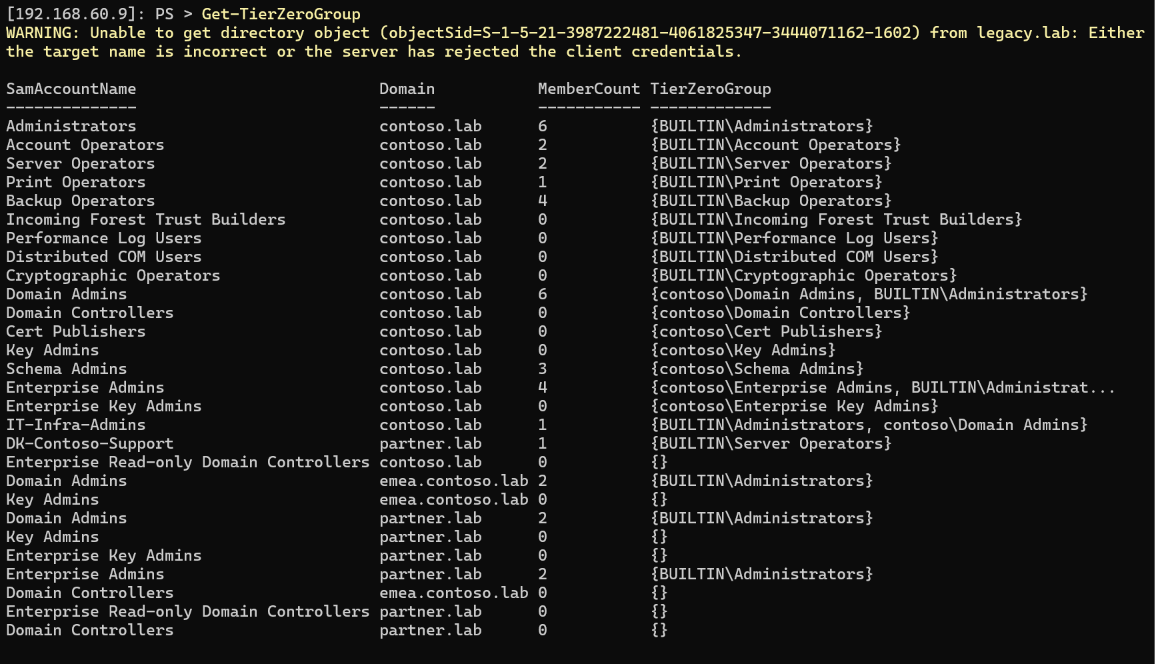
IT-Infra-Admins is there via Domain Admins, and DK-Contoso-Support from partner.lab via Server Operators.
Reporting
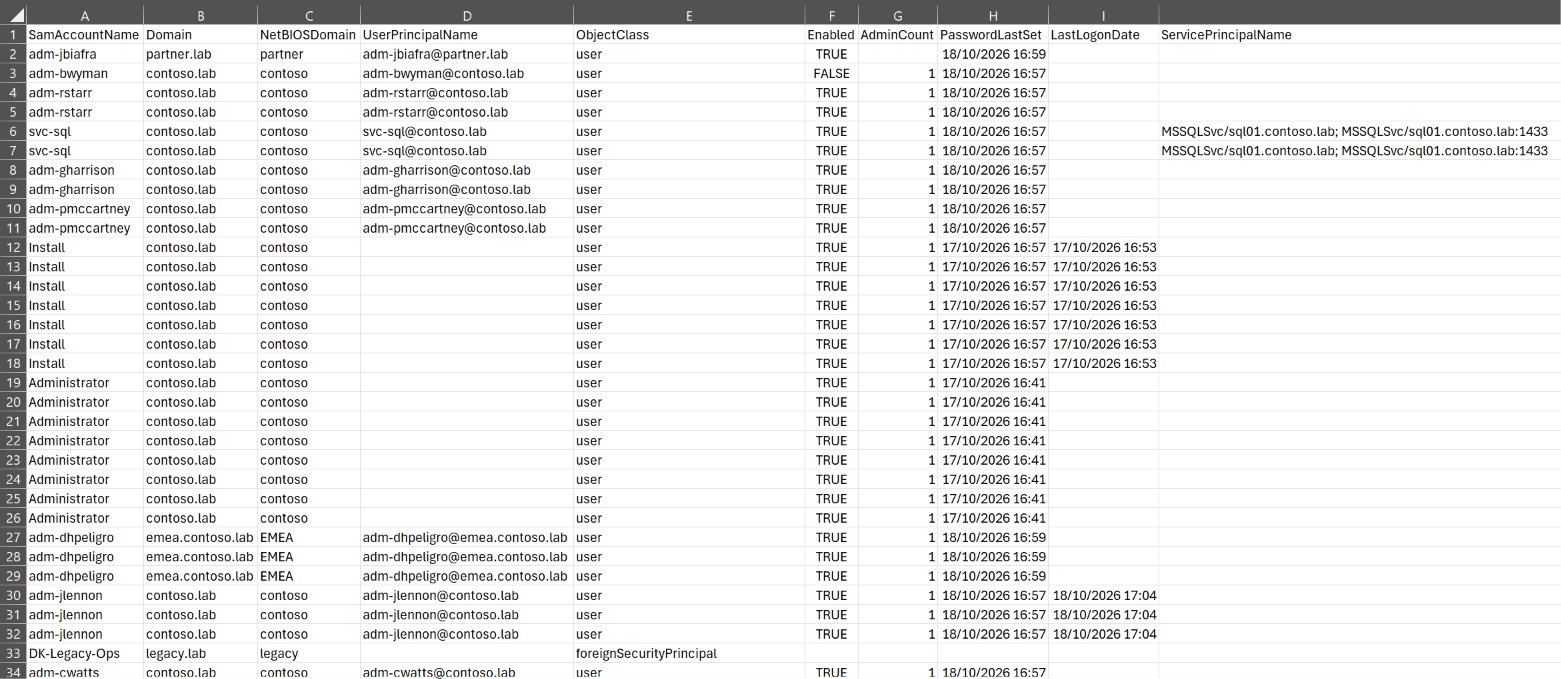
ConvertTo-TierZeroReport flattens the accounts to one row per reason, for CSV and spreadsheets:
$T0 | ConvertTo-TierZeroReport | Export-Csv -Path .\T0.contoso.lab.csv -NoTypeInformation
Checking PAM Coverage
With a psPAS session open, Compare-TierZeroAccount takes the Tier Zero accounts from the pipeline and the PAM accounts as -PAMAccount, and adds an InPAM property to each. It matches on user name and domain, accepting DOMAIN\user and user@domain names as well as an address of the domain - its defaults match the userName and address properties of a psPAS account, so the output of Get-PASAccount can be passed straight in.
Comparing against the existing safe:
$Cmp = $T0 | Compare-TierZeroAccount -PAMAccount (Get-PASAccount -safeName T0-Domain-Admins)
$Cmp | Group-Object InPAM | Format-Table Name, Count

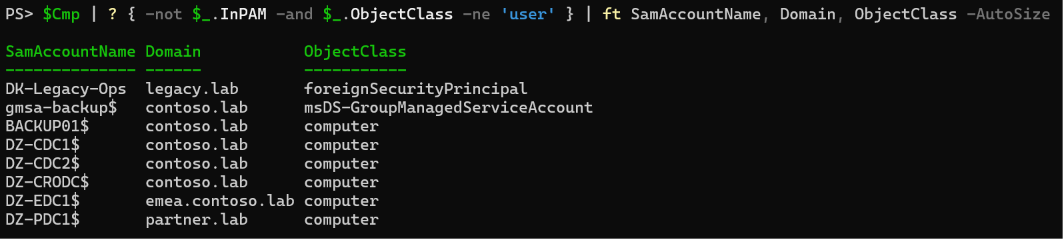
Seven of thirty nine. The gap splits into two kinds of account. Computer accounts, group managed service accounts and unresolved foreign security principals have no password a PAM tool should be managing:
$Cmp | Where-Object { -not $_.InPAM -and $_.ObjectClass -ne 'user' } |
	Format-Table SamAccountName, Domain, ObjectClass -AutoSize
The user accounts are the onboarding backlog:
$Cmp | Where-Object { -not $_.InPAM -and $_.ObjectClass -eq 'user' } |
	Select-Object SamAccountName, Domain, Enabled, @{n = 'Source'; e = { $_.Source -join ', ' } } |
	Format-Table -AutoSize
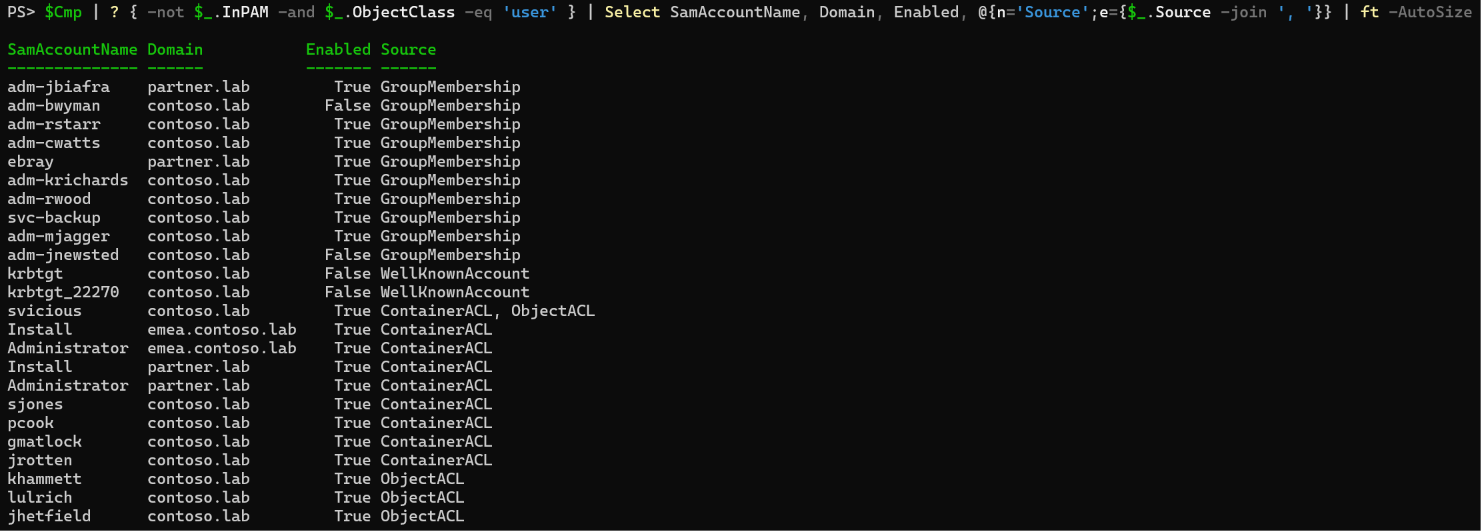
Not every one of these should simply be vaulted - sjones holding DCSync rights is probably a permission to remove rather than an account to manage, and the disabled adm-bwyman is a candidate for deletion. That’s the value of the Reason property: it tells you whether the answer is “vault it” or “fix it”. Either way, until it’s fixed, it belongs in the vault.
Onboarding
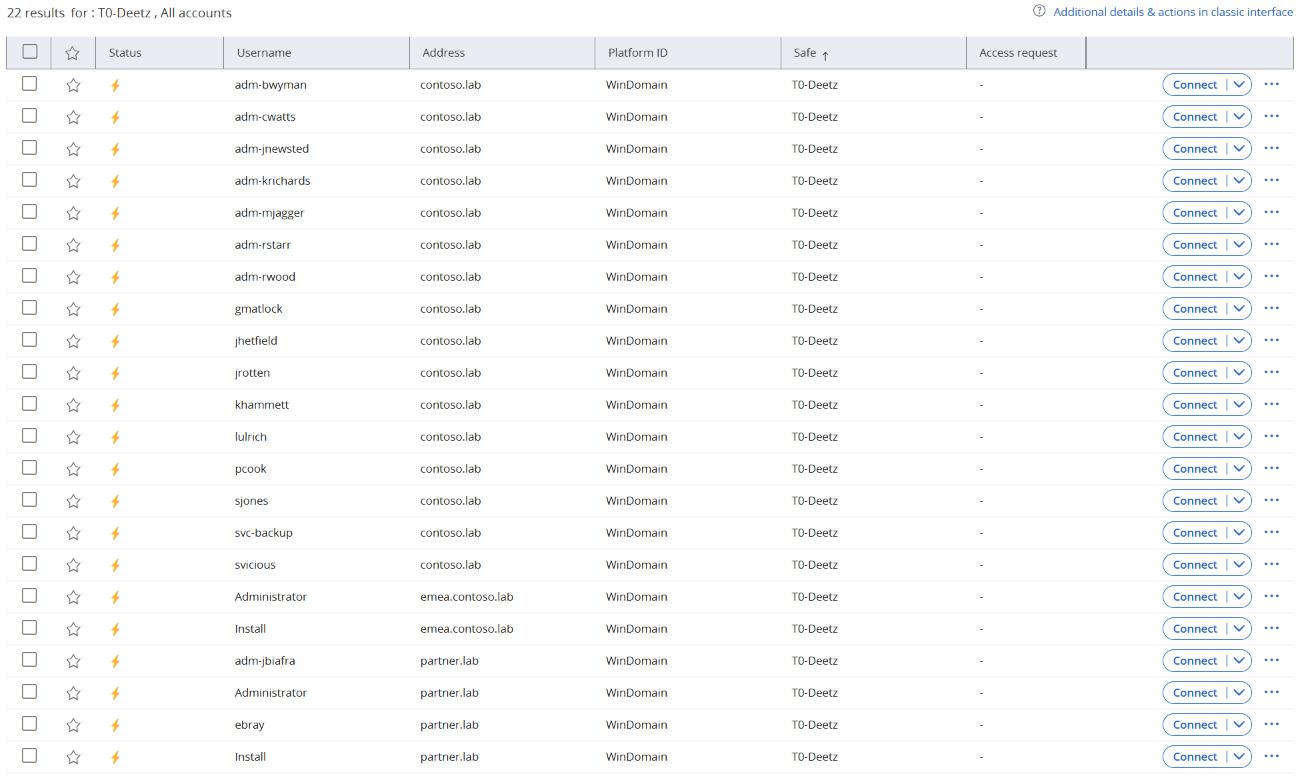
ConvertTo-PAMAccount turns Tier Zero user accounts into onboarding records - userName, address, platformID and SafeName - for a CSV, or to pipe to Add-PASAccount. Accounts which aren’t users are skipped.
The krbtgt accounts are users, but they’re managed by a scheduled reset, not by a PAM tool, so they’re filtered out here:
Add-PASSafe -SafeName T0-Deetz -Description 'Tier Zero found by Deetz' -ManagingCPM '' -NumberOfDaysRetention 7

$New = $Cmp | Where-Object { -not $_.InPAM -and $_.SamAccountName -notlike 'krbtgt*' } |
	ConvertTo-PAMAccount -SafeName T0-Deetz -PlatformID WinDomain
$New | Format-Table -AutoSize
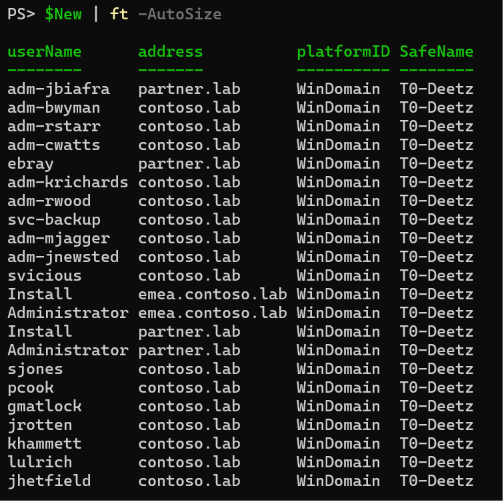
The address is the account’s DNS domain, so the partner.lab and emea.contoso.lab accounts land with the right address - the PAM tool needs connectivity to those domains to manage them, but nothing else changes.
$New | Add-PASAccount
Checking Again
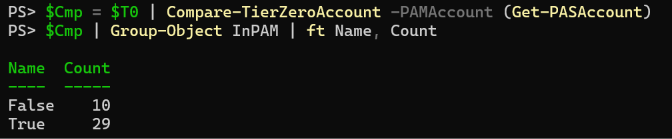
Comparing against every account in the vault this time:
$Cmp = $T0 | Compare-TierZeroAccount -PAMAccount (Get-PASAccount)
$Cmp | Group-Object InPAM | Format-Table Name, Count
$Cmp | Where-Object { -not $_.InPAM }
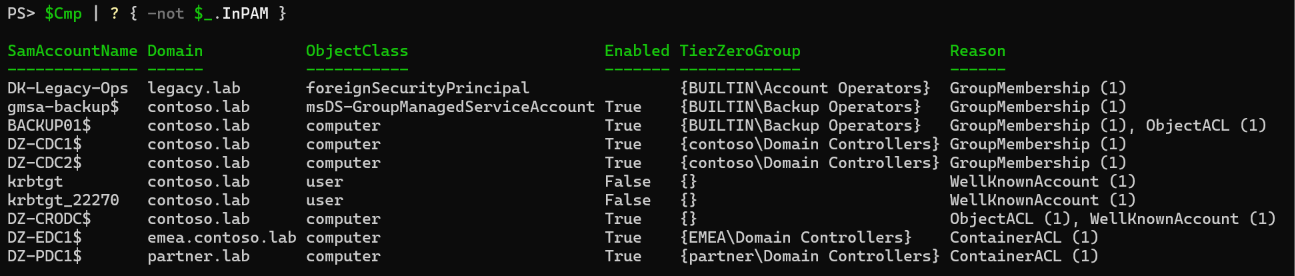
Ten left, none of them PAM onboarding work, but each one still Tier Zero:
- Domain controllers (
DZ-CDC1$,DZ-CDC2$,DZ-CRODC$,DZ-EDC1$,DZ-PDC1$) - Tier Zero assets. The accounts which administer them were onboarded above; what’s left is protecting and monitoring the machines themselves. BACKUP01$- a Backup Operators member and able to read the gMSA password. Either harden it like a domain controller, or take it out of Backup Operators.gmsa-backup$- its password is managed by AD. Control who can read it -jhetfield, who can, is now vaulted.krbtgt,krbtgt_22270- not something to vault. Their password reset has its own process; see Microsoft’s FAQs from the Field on KRBTGT Reset.DK-Legacy-Ops- unknown until Deetz is run with-Credentialfor an account which can readlegacy.lab.
Keeping It Current
Tier Zero drifts. A helpdesk group gets reset rights on the wrong OU, a vendor’s group is nested into an operator group, a gMSA gets a new reader. Running the comparison on a schedule turns this from a one off exercise into a control:
Get-TierZeroAccount -Domain contoso.lab |
	Compare-TierZeroAccount -PAMAccount (Get-PASAccount) |
	ConvertTo-TierZeroReport |
	Export-Csv -Path ".\T0-$(Get-Date -Format yyyyMMdd).csv" -NoTypeInformation
Rows where InPAM is false are the work list, and the Reason columns say why each one is there.
Summary
Vaulting Domain Admins and Enterprise Admins covered seven of the thirty nine Tier Zero accounts in this lab. The rest came from operator groups, nesting, ACLs, delegation, gMSA readers and trusts - all of them real paths to domain control, and all of them invisible to a PAM programme that stops at the two obvious groups.
Deetz finds them and explains why each one is there; psPAS gets them into the vault. Between them, Get-TierZeroAccount, Compare-TierZeroAccount, ConvertTo-PAMAccount and Add-PASAccount take you from “we vault the Domain Admins” to knowing - and showing - what’s actually covered.
Did we forget anything?
Let us know if there is any further information you would want to see or if you have any questions that have not been answered.
